
Zipkart - Quick Commerce & Grocery Delivery App with Flutter, Firebase & Admin Panel
55% off 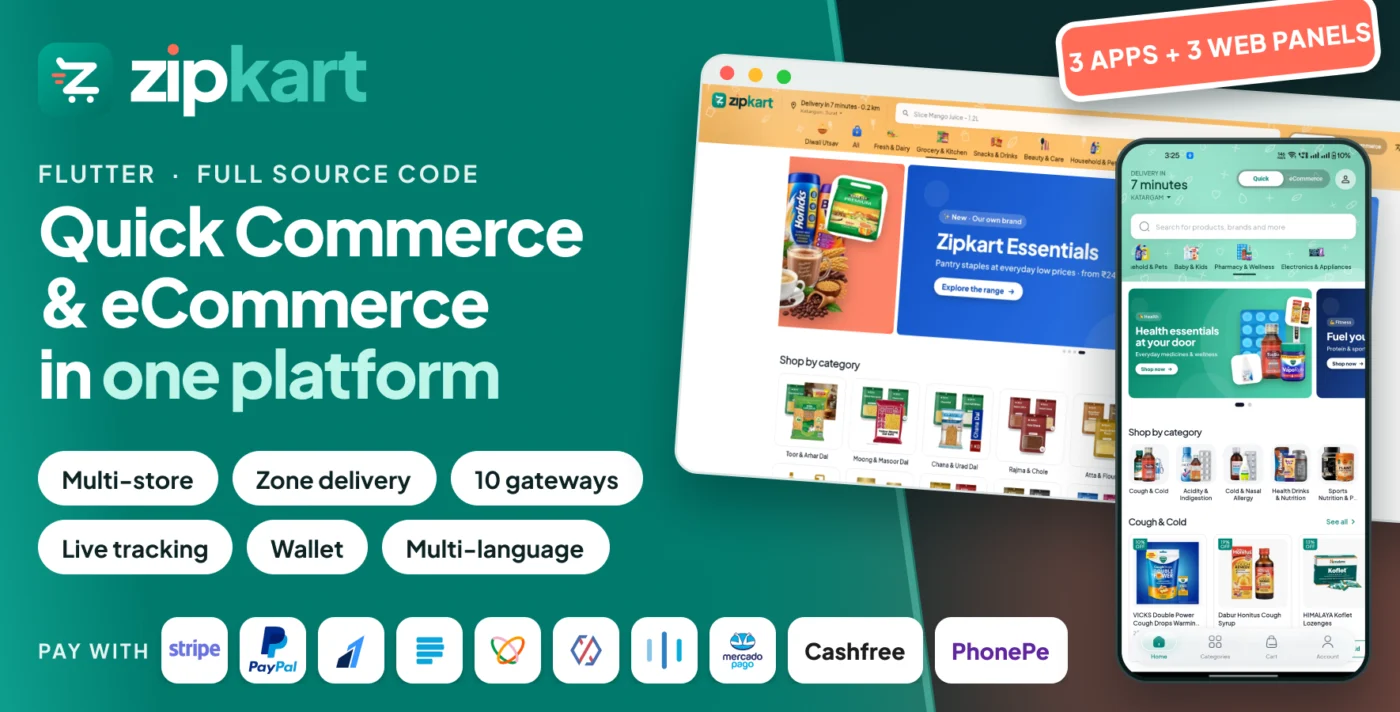
Why buy direct?
Same product as our CodeCanyon item — more when you buy here
| Feature | Elaynetech | CodeCanyon |
|---|---|---|
| Same code & free lifetime updates | ||
| Pay in ₹ with UPI, cards or net banking | USD only | |
| GST invoice with your GSTIN | International invoice | |
| Installation & setup in the same order | — | |
| Talk to the developers directly | WhatsApp & email | Item comments |
Prefer CodeCanyon? That's fine too — it's the same code, updated and supported by the same team.
Zipkart | Quick Commerce and Grocery Delivery App with Flutter, Firebase and Admin Panel
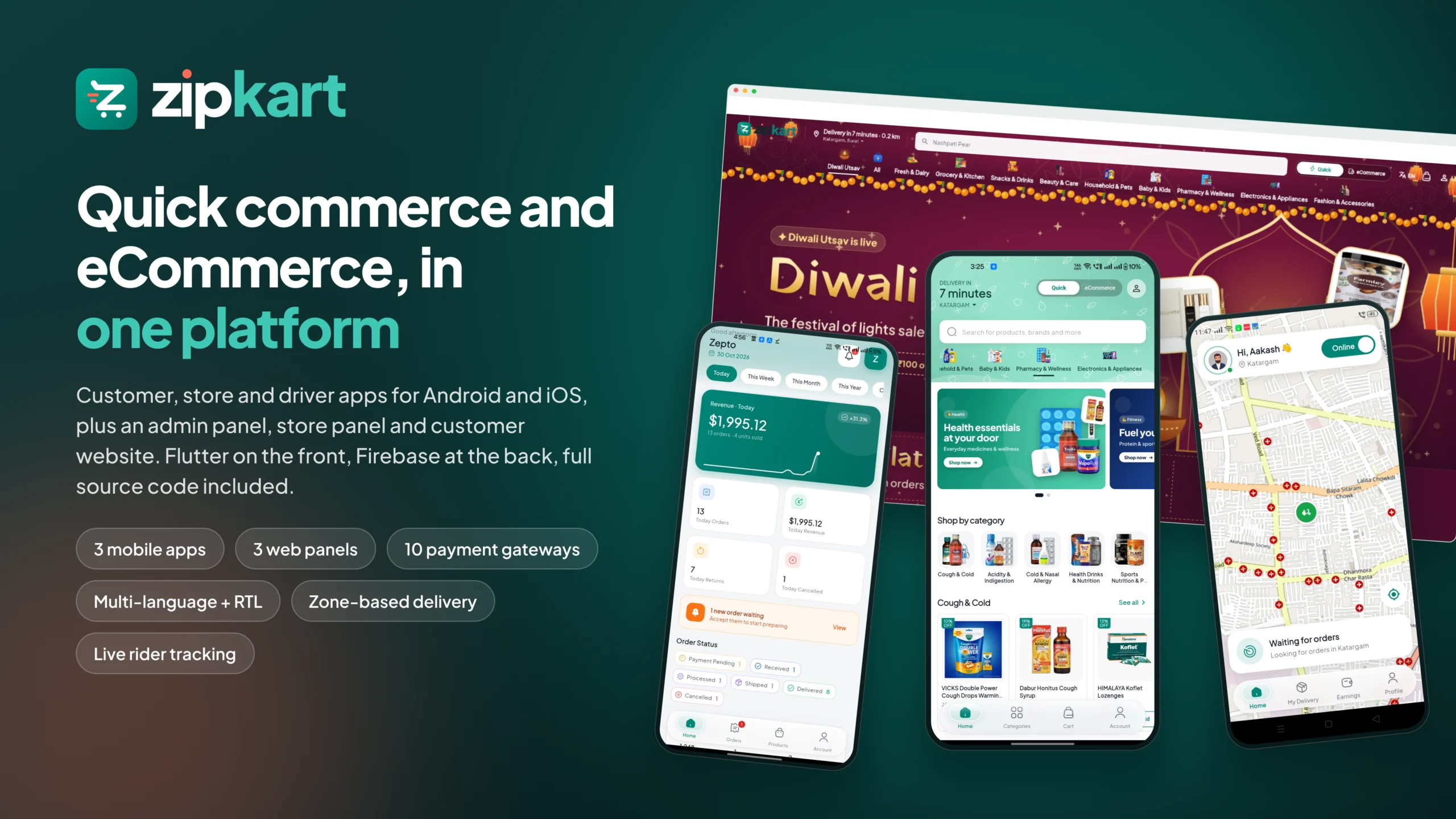
Zipkart is a complete grocery delivery and online shopping solution with full source code. One
purchase gives you a customer app, a store app and a delivery boy
app for Android and iOS, plus a web admin panel, a store panel and a
customer website. Everything runs on one managed cloud backend, so there is no VPS server to rent, patch
or scale.
Run a quick commerce business that delivers groceries, food, pharmacy items and daily essentials in
minutes from the nearest store, an eCommerce store that ships a full catalogue anywhere, or both at
the same time from one admin panel. Zipkart is built for hyperlocal delivery startups, supermarket chains, pharmacies,
electronics and fashion retailers, and any brand that sells through several stores or branches.
Why businesses choose Zipkart
- Two sales channels, one platform: instant delivery and standard eCommerce shipping, each with its
own catalogue, home screen and delivery rules. - Automatic rider dispatch: every order is offered to the nearest free delivery boy with a
countdown, so orders move without anyone on the phone. - Many stores, one brand: onboard any number of stores, each with its own login, prices, stock,
commission, staff and payouts. - Design without code: the Home Builder and Page Builder let you design the app and website home
screens from the admin panel, per zone and per channel. - Pay the local way: cash on delivery, in-app wallet and 10 online payment gateways covering India,
South-East Asia, Africa, Latin America, Europe and the USA. - Any market: unlimited languages with right-to-left support, any currency, your own tax rules, and
OpenStreetMap or Google Maps. - Serverless and secure: prices, payments, wallets, refunds and stock are calculated on the
server behind strict database security rules. Nothing sensitive lives in the apps. - Live in an afternoon: a one-click setup tool deploys the whole backend with starter data, and
step-by-step documentation covers every screen.
 |
 |
 |
 |

 |
 |
 |
Try the live demo
Scan a QR code in the banner at the top of this page with your phone, or use the links below. iOS demos install
through Apple TestFlight. Android demos are APK files.
Mobile apps
| Customer App | Android APK | iOS TestFlight |
| Store App | Android APK | iOS TestFlight |
| Delivery Boy App | Android APK | iOS TestFlight |
Web panels
store@zipkart.com 123456 |
admin@zipkart.com 123456 |
Saving is turned off in the admin and store panel demos so they stay tidy for every visitor. Place a test order in the customer app and watch it ring in the store
app and reach the delivery boy app.


Zipkart at a glance
- 3 mobile apps: customer, store and delivery boy, for Android and iOS
- 3 web panels: admin panel, store panel and customer website
- 2 sales channels: quick commerce and eCommerce
- 10 online payment gateways plus cash on delivery and wallet
- 8 Home Builder section types and unlimited landing pages
- 12 report types with CSV export
- 48 Cloud Functions and 95 database indexes, deployed for you
- Unlimited stores, zones, products, riders and languages
Who is Zipkart for?
- Grocery delivery and 10-minute delivery startups
- Supermarkets and local stores going online
- Pharmacy and medicine delivery
- Food, snacks, bakery and dairy delivery
- Electronics, fashion, jewellery and toy stores with home delivery
- Brands with several branches or dark stores across a city or country
- Agencies building a hyperlocal delivery app for a client
Customer app and website
The customer app is the shop in your customers’ pocket. The same Flutter code also builds the customer website, so
the web shop and the app always match.
- Quick commerce and eCommerce in one app with a switch at the top: delivery in minutes from the
nearest store, or the full catalogue shipped in days. - Home screens you design: category tabs with their own colours and headers, banner sliders, grid
banners, product sliders, tabbed products, top brands and headings, all from the admin panel. - Product discovery: search with suggestions, filters and sorting, categories and sub-categories,
brands, product variants, ratings and reviews, wishlist and back-in-stock alerts. - Smart checkout: saved addresses picked on the map, delivery instructions, promo codes, zone-based
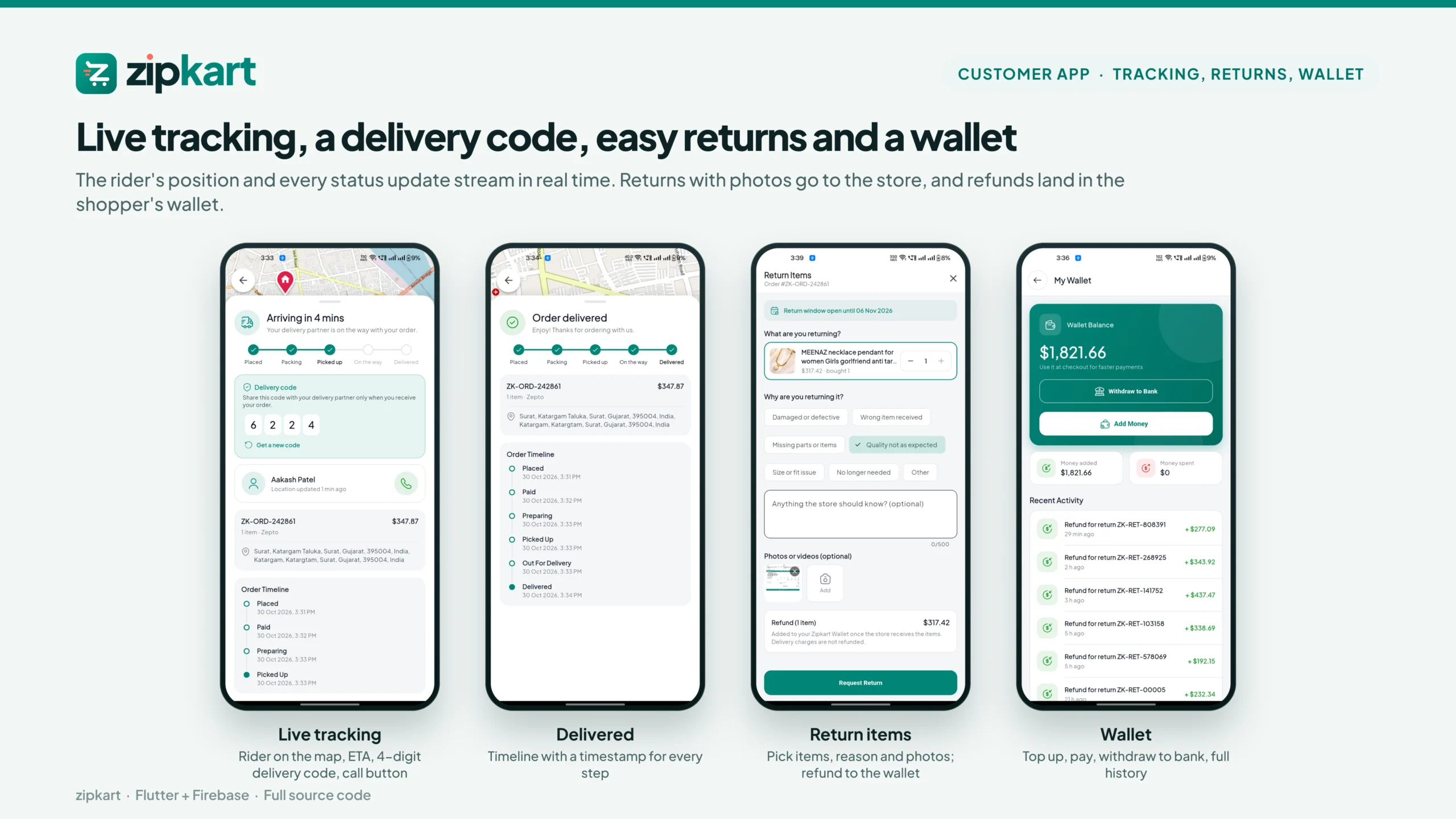
delivery charges, minimum order and free delivery rules, tax breakdown and a clear bill. - Pay any way: cash on delivery, in-app wallet or any of the 10 online gateways. Wallet top-up and
withdrawal to a bank account. - Self pickup: customers collect from the store with a pickup code.
- Live order tracking: follow the rider on the map with an ETA, call the rider, and hand over with
a 4-digit delivery code (OTP). - Returns and refunds: request a return with photos or a video, choose a reason, and get the refund
in the wallet. - Account area: ongoing and completed orders, invoices, transaction history, chat with the store,
notification settings, language switch and policies. - Sign-in options: phone number with OTP, email and password, Google, and Apple on iPhone. You
switch each one on or off from the admin panel. - Popup offers and push notifications for sales, cart reminders, order updates and refunds.
Store app and store panel
Store owners and their staff run the shop from the phone or from a desk in the browser. Both are built from the same
code.
- Ringing order alerts: a new order rings on the phone and in the panel, with accept and reject in
one tap. - Order flow: preparing, ready for pickup, handed to the rider and delivered, with invoice and
packing slip PDFs. - Rider assignment: automatic dispatch to the nearest free rider, search again, or assign one of
the store’s own riders. - Catalogue in minutes: add products from the shared catalogue with the store’s own price and
stock, or create new products with variants in four steps. - Stock management: stock per variant, low-stock and out-of-stock alerts.
- Returns: approve or reject, schedule a pickup by rider or drop-off at the store, mark received
and refund to the customer’s wallet. - Staff accounts with screen-by-screen permissions, so cashiers and packers see only what they
need. - Money: earnings per order after commission, payout requests, and 12 reports.
- Also: self pickup orders, product reviews with replies, chat with customers and the admin,
opening hours and preparation time.
Delivery boy app
Riders sign up in the app, upload the documents you ask for, and start earning once you approve them.
- Automatic offers: go online and nearby orders are offered one at a time with a countdown, showing
the earning, pickup and drop distance before accepting. - Rings like a call, even on a locked phone, so no order is missed.
- Guided delivery: navigation to the store and to the customer, one-tap calling, pickup
confirmation and handover with the customer’s delivery code. - Cash on delivery: collected cash is tracked in the rider wallet and settled with the admin,
online or in person. - Return pickups collected from customers and taken back to the store.
- Earnings and wallet: daily and total earnings, statistics, wallet top-up and withdrawal to a bank
account. - Onboarding: sign-up with document upload, document approval or rejection with a reason, and a
minimum wallet to go online.
Admin panel
A Flutter web panel that runs in any browser. Every setting of every app lives here, so you change logos, colours,
texts, payments, delivery charges and languages without touching code.
- Dashboard: live orders, revenue, order status, top stores and products.
- Orders, self pickup and returns across every store, with status updates, rider assignment and
refunds to wallet. - Countries and delivery zones drawn on the map, each with its own base charge, per-kilometre
charge, minimum order, free-delivery amount, surge time slots and extra charges. Quick commerce and eCommerce zones
are separate. - Stores: location on the map, zone, commission, opening hours, owner login, permissions and
payouts with settlement history. - Catalogue: categories and sub-categories, attributes that create variants, brands, products with
images and videos, bulk upload and bulk update from Excel, stock overview and alerts. - Home Builder: design the app and website home screen per zone and per channel, with category
tabs, draft and publish, scheduled publishing and a live preview for phone, tablet and web. - Page Builder: landing pages for sales and festivals, linked from any banner.
- Delivery boys: sign-up requests, required documents, approvals, wallets, cash settlement,
withdrawal requests and performance. - Customers: profiles, orders, wallets with manual adjustments, wallet withdrawals, carts,
wishlists, stock alerts and payment transactions. - Marketing: promo codes with nine rule groups (discount type, cashback, products, cart conditions,
usage limits, schedule, audience, platform, zones), popup offer and push notification campaigns to customers, stores
or riders. - Earnings and 12 reports: profit per order, sales, orders, products, customers, inventory,
returns, delivery boys, payments, categories, coupons and tax, each with CSV export. - Settings: branding per app, currency, login methods, services on and off, delivery charges, cart
reminders, payment gateways, taxes, invoice design, bank form, SMTP email, notification and email templates,
languages, social links, about and contact pages, policies, cancel reasons, maintenance mode and map provider.
Customer website and store panel on the web
The customer website is a full storefront in the browser with the same Home Builder layouts as the app: search with
suggestions, guest cart with login at checkout, wallet, live tracking, returns and policy pages. It is responsive and
installable as a web app. The store panel gives store owners a desk-sized view of orders, products, stock, staff and
reports.
Built for your market
Payment gateways
Cash on Delivery, Zipkart wallet, Stripe, PayPal, Razorpay, Paystack, Flutterwave, Xendit, Midtrans, Mercado
Pago, Cashfree and PhonePe. Each gateway has sandbox and live modes, a built-in key test, and secret keys
that never leave the server.
Languages, currency and maps
- Add any number of languages from the admin panel and upload one translation file per app. Right-to-left languages
such as Arabic and Urdu flip every screen automatically. - Product names, categories, banners, notifications and emails can be written in every language.
- Any currency, symbol and decimal format, with your own taxes per country.
- OpenStreetMap out of the box at no cost (within its fair-use limits), or Google Maps with your own key.
Notifications
- Push notifications for every order, return, wallet and payout event on Android, iOS and the web, with editable
templates per language. - Email notifications through your own SMTP account, with editable templates.
- Marketing push campaigns to customers, stores or riders, with a picture and a link.
Technology and security
- Flutter 3 and Dart with GetX for state, routing and dependency injection. One codebase per app
for Android, iOS and web. - Firebase: Authentication, Cloud Firestore, Cloud Storage, Cloud Messaging and Cloud Functions on
Node.js 22. - Server-side business logic: checkout, prices, stock, coupons, payments, refunds, wallets and
rider dispatch run in Cloud Functions, so they cannot be changed from a modified app. - Default-deny security rules for Firestore and Storage, with roles for admin, store staff, riders
and customers. - Real-time sync: a product added in the admin panel appears in the apps at once; an order placed
rings in the store app immediately. - Pay as you grow: Firebase bills by usage and includes a monthly allowance at no charge, so a new
business starts small. - Clean, commented code organised by module, with a translation key extractor for developers.
What is included
- Customer app: Flutter source for Android, iOS and the customer website
- Store app: Flutter source for Android, iOS and the store panel
- Delivery boy app: Flutter source for Android and iOS
- Admin panel: Flutter web source
- Cloud Functions source (48 functions, Node.js 22)
- Firestore and Storage security rules and 95 indexes
- One-click setup tool that deploys rules, indexes, functions and a starter database
- Documentation with screenshots for every step, included in the download and online
- Updates for the life of the item at no extra cost
Requirements
- A Firebase project on the Blaze (pay-as-you-go) plan. Cloud Functions, Storage and phone sign-in need it. It
includes a monthly allowance at no charge. - Flutter SDK (latest stable), Android Studio and Node.js 20 or newer on Windows, macOS or Linux
- A Mac with Xcode to build and publish the iOS apps
- Google Play Console and Apple Developer accounts to publish the apps
- Hosting for the three websites: Firebase Hosting or any web server or cPanel host
- Optional: a Google Maps API key, a payment gateway account and an SMTP email account
Third-party services and costs
Zipkart has no monthly fee of its own and takes no share of your sales. It runs on a few outside services. Most are
free to start, and you pay only as your business grows. Prices change, so check each provider’s current price page
before you launch.
| Service | Required? | Free to start? | How you pay |
|---|---|---|---|
| Firebase (Blaze plan) | Yes | Yes, a free amount every month | Per use: database reads and writes, storage, function runs, SMS codes |
| Google Maps Platform | No. OpenStreetMap is included at no cost, within its fair-use limits | Yes, a free amount per API each month | Per request after the free amount |
| Payment gateways | No. Cash on Delivery works without one | No set-up fee for most | A percentage per online payment, charged by the gateway |
| Email (SMTP) | Recommended | Most providers have a free tier | Per email after the free tier |
| Apple Developer Program | For the iPhone apps | No | Yearly fee |
| Google Play Console | For the Android apps | No | One-time fee |
| Domain and web hosting | For the websites | Firebase Hosting has a free tier | Domain per year, hosting per plan |
What drives the Firebase bill. The Blaze plan includes a free amount every month: 50,000 database
reads and 20,000 writes per day, about 5 GB of picture storage, 2 million Cloud Function runs, and push notifications
at no charge. A small shop often pays little or nothing. Costs grow with shoppers opening the app, orders placed
(about 35 to 40 function runs per order) and pictures downloaded. Each SMS code for phone sign-in is charged by
country, so offer Google, Apple or email sign-in as well.
Keep costs low: set a budget alert in Firebase, upload product pictures at a sensible size, and use
the included OpenStreetMap maps unless you need Google Maps. You can also launch in steps: many owners start with the
Android apps and the websites, and add the iPhone apps later.
Setup in one afternoon
- Step 1: create a Firebase project and run the setup tool. It deploys the security rules, indexes,
Cloud Functions and a starter database with example categories, products, zones and stores in one click. - Step 2: connect the apps with one FlutterFire command per app.
- Step 3: sign in to the admin panel and fill in branding, currency, zones, stores, payments and
login methods. No database editing. - Step 4: set your package names, app icons and keys, then build the Android and iOS apps.
- Step 5: build and host the websites, add the push keys and go live.
The online
documentation walks through each step with annotated screenshots, a setup checklist that saves your progress, a
troubleshooting page and an FAQ.
Support and customization
Questions before you buy, or help after? Message us on WhatsApp +91 99046 97433, email info@elaynetech.com, or use the Comments tab on this page. Support covers bugs in the delivered
code, questions about how features work and help finding the right setting. Installation, hosting, app store
publishing, reskinning and new features are available as paid services.
Please note
- Zipkart is a single-brand, multi-store platform. You create each store and its owner login in the admin panel.
There is no public seller sign-up. - Product images, names and brands shown in the demo and starter data are for preview only. Replace them with your
own before you launch. - Firebase, Google Maps, your email (SMTP) provider, payment gateways and SMS for phone sign-in are third-party
services. They charge you directly, so using them incurs external costs on your side. - The default OpenStreetMap services (map tiles, Nominatim address search and the OSRM route server) are free public
services with fair-use limits, such as at most 1 address search per second and no search-as-you-type. They suit
testing and small shops; for a busy shop use Google Maps or a commercial OpenStreetMap provider. The documentation
lists the limits and links each policy. - Parts of this item were created with the help of AI tools: some of the source code, the documentation and some of
the preview graphics. Everything was reviewed, edited and tested by the Elaynetech team. - Building the iOS apps requires a Mac with Xcode. Android and the websites can be built on Windows, macOS or Linux.
- Cash on delivery works without a payment gateway. Online payments need an account with at least one supported
gateway.
Changelog
Version 1.0.0
- Initial release




Version 1.0.0
- Initial release
You may also like